
For those who use the original version of Xun Lei (Thunder 5) downloaded from its main site www.xunlei.com, and not the modified version as available from Hehehunter.com, you might feel frustrated with the amount of hidden spywares and ads that this software bring even though it can be very fast in terms of download speed. So how to completely remove it?

Xun Lei is a bit harder to remove using Windows own uninstaller, even if you do so, you’ll find it stil sticking around your registry. So I do recommend you to use a third-party uninstaller like Revoinstaller. You can download Revoinstaller here. It’s small in size and very efficient. Here are the steps to completely remove Xun Lei from your computer using Revo Uninstaller:
Step 1. Run Revouninstaller after install
Step 2: Locate Xunlei on the RevoUninstaller screen (Note: If you don’t have chinese language support, the name for Xunlei will look like this: ѸÀ× 5)
.jpg)
Step 3: Double Click on it and Click YES when asked whether you are sure to remove Xunlei.
Step 4: You’ll be brought to a screen asking you the Uninstall Mode, choose ADVANCED, then NEXT

Step 5: RevoUninstaller will scan your computer and remove Xunlei Thunder 5 core files (the Uninstaller for Xunlei will appear, just uninstall accordingly), then click Next when done.
Step 6: Revouninstaller will then scan deeper for any leftovers.
Step 7: Remove/Delete all XunLei Registry Entry as Highlighted in Bold (See Picture, click to Enlarge)
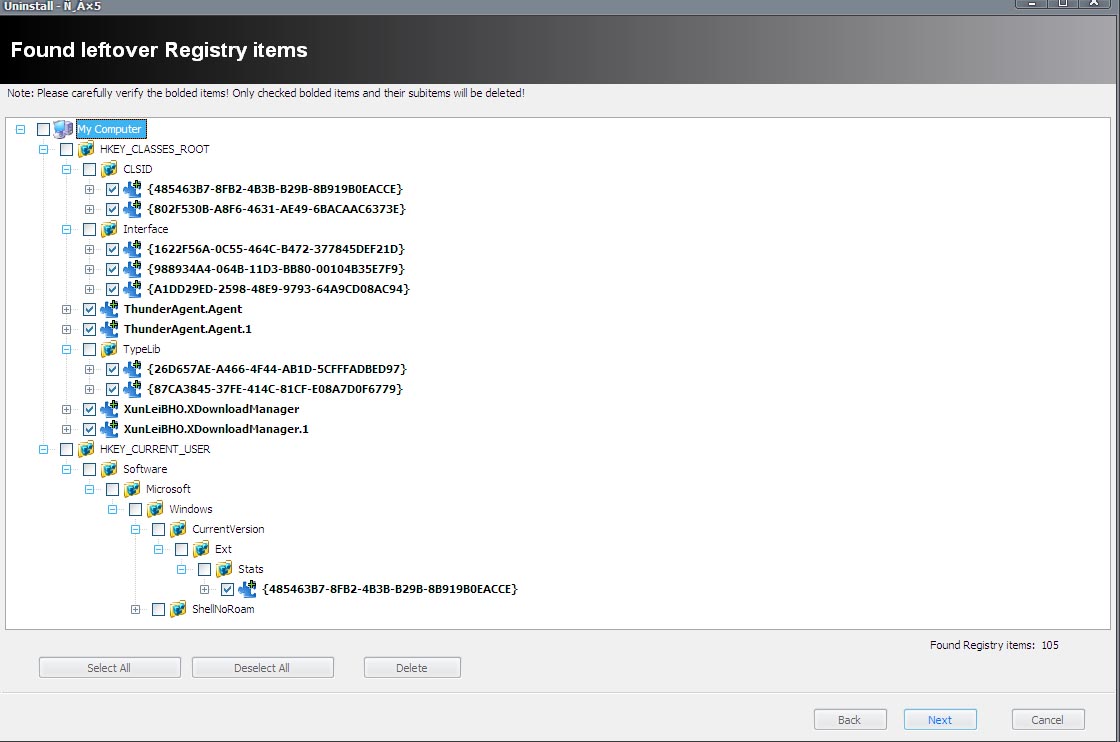
Step 8: Remove all XunLei Leftover Folders and files.
DONE!
If you have installed gougou toolbar as well, remove it from Revo following the same steps.



3 Comments